
In part 7, we installed Proxmox on the four nodes: disks wiped, auto-installable ISOs, the battle of the UEFI boot won. By the end, four machines were running… but they didn’t know each other yet. Four isolated islands.
This phase 2 is the moment the infrastructure truly becomes as code: we configure the hosts, create the ZFS pools, and above all stand up the three-node Proxmox cluster, all of it driven by Ansible and replayable from GitLab.
And it’s also the phase where I learned, the hard way, a lesson I’ll be repeating throughout this article: a perfectly green PLAY RECAP doesn’t mean the result is good. Two serious bugs slipped through a “successful” playbook without a single red light. We’re going to pull them apart to learn from these mistakes.
A change of direction: home-grown roles rather than lae.proxmox#
Before writing a single line, a decision. In part 5, I planned to use the community lae.proxmox role to configure Proxmox. When it came time to actually get started, I changed my mind: I’m writing my own playbooks and roles.
Why? Because the number one goal of this lab is to learn. Using a black box that does everything for me (configuring the repositories, creating the ZFS pool, standing up the cluster) would have robbed me of understanding what’s actually happening. By writing each role myself, I see and understand every action. A bit more code to maintain, yes, but it’s more fun to learn that way.
This is exactly the kind of situation I document all my choices for, and especially the changes when there are any. In six months, I’ll know why I made this choice. lae.proxmox stays tucked away in a corner of my mind in case the lab one day needs to be industrialised or simplified for maintainability reasons.
I also took the opportunity to switch the whole repo to English (code, comments, commit messages). And I’m imposing a rule on myself about comments: explain a non-obvious why, never paraphrase the code.
Step 1: the Ansible foundations#
It all starts with a clean tree:
ansible/
├── ansible.cfg
├── requirements.yml
├── inventory/
│   └── hosts.yml
├── group_vars/
│   ├── all.yml
│   └── pve.yml
└── roles/ # filled in across steps 2 to 5A layout trap, right from the start. I’d tidied my playbooks away into an ansible/playbooks/ subfolder, all neat. Mistake: ansible-lint looks for roles next to the playbooks and hit me with syntax-check[specific]: The role was not found. The playbooks and the roles/ folder must be siblings, at the root of ansible/.
The configuration#
All of Ansible’s behaviour is set in ansible.cfg:
# ansible/ansible.cfg
[defaults]
inventory            = inventory/hosts.yml
roles_path           = roles
collections_path     = ~/.ansible/collections
host_key_checking    = False
interpreter_python   = /usr/bin/python3
stdout_callback      = default
result_format        = yaml
bin_ansible_callbacks = True
vars_plugins_enabled = host_group_vars,community.sops.sops

[ssh_connection]
pipelining = True
ssh_args   = -o ControlMaster=auto -o ControlPersist=60s
Nothing exotic, but two or three settings deserve a word. host_key_checking = False saves me from having to validate each node’s SSH fingerprint on the first connection (acceptable on a lab LAN I control). The [ssh_connection] section, with pipelining and ControlPersist, noticeably speeds up runs by reusing SSH connections from one task to the next. But the truly important line is the last one of the defaults section:
vars_plugins_enabled = host_group_vars,community.sops.sopsIt enables the community.sops.sops plugin, which automatically decrypts the group_vars/*.sops.yaml files at runtime. The machinery laid down in phase 0 (SOPS + age) is thus ready to use: the day a group variable contains a secret, I’ll write it encrypted and Ansible will read it in plaintext on the fly, without anything sensitive ever touching the disk. This is exactly what I wanted from the very start.
A snag on the very first run: a vanished callback#
Those two lines (stdout_callback and result_format) didn’t turn up by chance. On the very first run, Ansible slammed the door in my face:
[ERROR] The 'community.general.yaml' callback plugin has been removed.The callback that formatted the output as YAML was removed from community.general in version 12.0.0. Ansible collections evolve fast and regularly pull in (or drop) plugins. Good news: the message itself points to the migration path it’s now an option of the native callback, hence the two lines above.
The bare minimum of dependencies#
On the collections side, requirements.yml stays short:
# ansible/requirements.yml
---
collections:
  - name: community.general
    version: ">=10.0.0"
  - name: community.sops
    version: ">=2.0.0"
Two collections only: community.general (everyday modules) and community.sops (on-the-fly decryption, the only truly indispensable one here). We’ll see at step 4 that I even went hunting for other tempting dependencies to stick to Ansible’s core wherever I could.
The inventory#
Two groups at this stage: pve (the three future cluster nodes) and pbs (the backup node, set aside for now). The pve_cluster_primary group variable designates the node that will carry the cluster initialisation.
# ansible/inventory/hosts.yml
---
all:
  children:
    pve:
      hosts:
        pve01:
          ansible_host: 192.168.3.11
        pve02:
          ansible_host: 192.168.3.12
        pve03:
          ansible_host: 192.168.3.13
      vars:
        pve_cluster_primary: pve01

    # Installed but parked: missing PSU, RAM upgrade pending
    pbs:
      hosts:
        pbs01:
          ansible_host: 192.168.3.20
This inventory will fill out over the phases to come (internal DNS, CI runner, …), but for phase 2, pve and pbs are enough.
The group variables#
There’s still a question the attentive reader might be asking: which user and which key does Ansible connect with? The answer is in group_vars/all.yml, which applies to every machine:
# ansible/group_vars/all.yml
---
ansible_user: root
ansible_ssh_private_key_file: "~/.ssh/kentrowlab_ed25519"

lab_domain: ktw.ovh
Ansible connects as root, then, with the SSH key dedicated to the lab generated in phase 1. No password to manage: the key is enough.
Then group_vars/pve.yml, specific to the cluster nodes, centralises the variables the roles will consume further down:
# ansible/group_vars/pve.yml
---
# Pool name must be identical across nodes: required by ZFS replication
zfs_pool_name: nvme-vm
zfs_pool_device: /dev/nvme0n1
zfs_arc_max_gb: 4
cluster_network: 192.168.3.0/24
Here we find the ZFS pool name (identical on all three nodes, a replication constraint we’ll come back to), the target disk, the ARC cap and the cluster network. Defining them once here avoids repeating them and above all avoids desynchronising them in each role.
At this stage, none of these variables is sensitive: the connection goes through an SSH key, so there’s no password to protect in group_vars. The only secret of the phase (the bootstrap credentials) still lives in secrets/ from phase 1. The SOPS plugin, for its part, is already wired up and just waiting for the first real secret to put into a group variable.
Validation#
The great classic for checking that Ansible really talks to the three nodes: a ping (which isn’t an ICMP ping, but a test of the SSH connection + remote Python interpreter).
> ansible pve -m ping
pve01 | SUCCESS => {
    "changed": false,
    "ping": "pong"
}
pve02 | SUCCESS => {
    "changed": false,
    "ping": "pong"
}
pve03 | SUCCESS => {
    "changed": false,
    "ping": "pong"
}
Three pongs. The foundations are there, we can start writing the roles.
A little subtlety: the result_format = yaml we set higher up only applies to playbook runs (via the callback). An ad-hoc command like ansible -m ping always comes out in JSON hence the display above. It’s cosmetic, but you may as well not be caught out by it.
Step 2: configuring the hosts (pve_base)#
As in phase 1, I start by looking before acting. I inspect a node to write a role that hits the target first time:
ansible pve01 -m shell -a "ls -l /etc/apt/sources.list.d/; cat /etc/modprobe.d/zfs.conf; pveversion"On a freshly installed node (before any role has run), this gives:
pve01 | CHANGED | rc=0 >>
total 12
-rw-r--r-- 1 root root 187 Jul 24 18:02 ceph.sources
-rw-r--r-- 1 root root 365 Jul 24 18:02 debian.sources
-rw-r--r-- 1 root root 204 Jul 24 18:02 pve-enterprise.sources
options zfs zfs_arc_max=3353346048
pve-manager/9.2.2/xxxxxxxxxxxxxxxx (running kernel: 7.0.2-6-pve)
Three useful discoveries:
- PVE 9.2 (based on Debian 13) uses the deb822 format: repositories are
.sourcesfiles, no more of the old.listones. - A
zfs.confalready exists, with azfs_arc_maxset by the installer (~10% of the RAM). - The Ceph repository is present even though I don’t use it, which pollutes every
apt update.
The pve_base role#
The role lives in a folder all of its own. With each new role, I’ll show you this little bit of the tree so we always know where we’re adding files:
ansible/roles/pve_base/
├── defaults/main.yml   # the tunable variables
├── handlers/main.yml   # the deferred actions (apt update, initramfs, pveproxy)
└── tasks/main.yml      # the core: what the role does, in order
The default variables first: everything that can be tuned without touching the code.
# ansible/roles/pve_base/defaults/main.yml
---
pve_base_debian_suite: trixie
pve_base_zfs_arc_max_gb: 4
pve_base_extra_packages:
  - vim
  - htop
  - tmux
  - curl
  - git
  - lsb-release

pve_base_do_upgrade: true
pve_base_remove_subscription_nag: true
Then the tasks. It’s a bit long, but each block is explicit and that’s precisely the point of having written it by hand rather than calling lae.proxmox: nothing is hidden.
# ansible/roles/pve_base/tasks/main.yml
---
- name: Disable enterprise repository
  ansible.builtin.copy:
    dest: /etc/apt/sources.list.d/pve-enterprise.sources
    mode: "0644"
    content: |
      Enabled: no
      Types: deb
      URIs: https://enterprise.proxmox.com/debian/pve
      Suites: {{ pve_base_debian_suite }}
      Components: pve-enterprise
      Signed-By: /usr/share/keyrings/proxmox-archive-keyring.gpg
  notify: Apt update

- name: Disable Ceph repository
  ansible.builtin.copy:
    dest: /etc/apt/sources.list.d/ceph.sources
    mode: "0644"
    content: |
      Enabled: no
      Types: deb
      URIs: https://enterprise.proxmox.com/debian/ceph-squid
      Suites: {{ pve_base_debian_suite }}
      Components: enterprise
      Signed-By: /usr/share/keyrings/proxmox-archive-keyring.gpg
  notify: Apt update

- name: Enable no-subscription repository
  ansible.builtin.copy:
    dest: /etc/apt/sources.list.d/pve-no-subscription.sources
    mode: "0644"
    content: |
      Types: deb
      URIs: http://download.proxmox.com/debian/pve
      Suites: {{ pve_base_debian_suite }}
      Components: pve-no-subscription
      Signed-By: /usr/share/keyrings/proxmox-archive-keyring.gpg
  notify: Apt update

- name: Refresh APT cache
  ansible.builtin.apt:
    update_cache: true

- name: Install extra packages
  ansible.builtin.apt:
    name: "{{ pve_base_extra_packages }}"
    state: present

- name: Upgrade system
  ansible.builtin.apt:
    upgrade: dist
  when: pve_base_do_upgrade | bool

- name: Cap ZFS ARC
  ansible.builtin.copy:
    dest: /etc/modprobe.d/zfs.conf
    mode: "0644"
    content: |
      options zfs zfs_arc_max={{ pve_base_zfs_arc_max_gb * 1024 * 1024 * 1024 }}
  notify: Update initramfs

- name: Remove subscription nag
  ansible.builtin.replace:
    path: /usr/share/javascript/proxmox-widget-toolkit/proxmoxlib.js
    regexp: "Ext\\.Msg\\.show\\(\\{\\s+title: gettext\\('No valid sub"
    replace: "void({ //"
    backup: true
  when: pve_base_remove_subscription_nag | bool
  notify: Restart pveproxy
We find our three discoveries again: repositories in deb822 format (.sources), enterprise and Ceph repositories disabled (Enabled: no), no-subscription enabled, and the ZFS ARC capped at 4 GiB. The notify: entries point to handlers, those deferred actions that only run at the end of the play:
# ansible/roles/pve_base/handlers/main.yml
---
- name: Apt update
  ansible.builtin.apt:
    update_cache: true

- name: Update initramfs
  ansible.builtin.command: update-initramfs -u -k all
  changed_when: true

- name: Restart pveproxy
  ansible.builtin.systemd:
    name: pveproxy
    state: restarted
Keep this detail about deferred handlers in mind: it’s exactly what caused the sneakiest bug of the phase.
The bug of the phase: cache_valid_time#
And here it is, THE bug.
The playbook runs, the PLAY RECAP is entirely green across all three nodes. All good… until I manually check the versions after reboot:
| Node | pve-manager |
|---|---|
| pve01 | 9.2.2 |
| pve02 | 9.2.5 |
| pve03 | 9.2.5 |
One node stayed on 9.2.2 while the others moved to 9.2.5. Silently. And a cluster with diverging pve-manager versions is an open door to protocol problems. Unacceptable before creating the cluster.
The cause is nasty:
- My tasks modify the APT repositories and notify an
Apt updatehandler. - Except handlers only run at the very end of the play.
- In the meantime, my
Refresh APT cachetask had acache_valid_time: 3600: “the cache is less than an hour old, I’ll do nothing”. - As a result,
Upgrade systemran with the old view of the world the one where the no-subscription repository wasn’t active yet. It only saw what it already knew.
An apt-cache policy pve-manager on pve01 confirmed the diagnosis: Installed: 9.2.2, Candidate: 9.2.5, around twenty packages waiting.
The fix is dead simple: refresh the cache unconditionally. That’s precisely the Refresh APT cache without cache_valid_time that you saw in the role above. The cache is thus systematically rebuilt right after the repositories are modified, before Upgrade system runs.
The central lesson of the phase. When a playbook has just modified the APT sources, the cache refresh must be unconditional. Handlers are deferred, and cache_valid_time masks precisely the change you’ve just applied. The PLAY RECAP stays green from start to finish: only an explicit check of the resulting state reveals the problem.
When idempotence isn’t possible#
A second surprise, while testing idempotence (replaying the playbook until you get changed=0): pve01 and pve03 settled quickly, but pve02 stayed at changed=3 one pass more than the others.
Why only that node? It’s a direct leftover of the previous bug. Because of the cache desync, pve02 was one update behind: it only picked up proxmox-widget-toolkit during that idempotence test, whereas pve01 and pve03 had already absorbed it on the previous pass. And updating that package rewrites proxmoxlib.js… exactly the file I patch to remove the subscription banner. Result, on that pass: the patch is wiped, my task reapplies it, pveproxy restarts → changed. Once pve02 caught up (on the 3rd pass), the three nodes finally converge on changed=0.
In other words, there was nothing special about pve02: it was just the straggler of the moment. The real lesson, though, is more general.
Not every task can be idempotent. Patching a file that belongs to a package is structurally fragile: every future update of proxmox-widget-toolkit, on any node, will undo the patch and bring back a changed. You have to know it, document it (# Cosmetic, reverted by proxmox-widget-toolkit updates) and plan for a backup: true. This isn’t a bug to fix, it’s a limitation to accept.
After a reboot (necessary: new kernel, and zfs_arc_max only takes effect when the ZFS module is reloaded), the three nodes are finally aligned: 9.2.5, identical kernel, ZFS ARC capped at 4 GiB.
Step 3: the ZFS pool on the NVMe (pve_zfs)#
An important scoping decision here: I create only the ZFS pool (the object on the disk), and not the Proxmox storage definition. Why? Because when a node joins a cluster, its local configuration is overwritten by the cluster’s. Declaring the storage now would be wasted work. We’ll do it afterwards, at step 5. That’s also why the pool must carry the same name on all three nodes.
The role is short, but each task counts:
ansible/roles/pve_zfs/
├── defaults/main.yml   # role variables (inherited from group_vars)
└── tasks/main.yml      # pool creation + safeguards + scrub
The role’s default values reuse the group variables defined at step 1: a single source of truth, and the pool really does carry the same name everywhere.
# ansible/roles/pve_zfs/defaults/main.yml
---
pve_zfs_pool_name: "{{ zfs_pool_name }}"
pve_zfs_device: "{{ zfs_pool_device }}"

# 4K sectors: correct for every modern SSD, cannot be changed after creation
pve_zfs_ashift: 12
pve_zfs_compression: lz4
And the tasks:
# ansible/roles/pve_zfs/tasks/main.yml
---
- name: Check whether pool already exists
  ansible.builtin.command: "zpool list -H -o name {{ pve_zfs_pool_name }}"
  register: pve_zfs_existing
  changed_when: false
  failed_when: false

- name: Resolve stable device path
  # by-id survives device renaming across reboots, unlike /dev/nvme0n1
  ansible.builtin.shell: |
    set -o pipefail
    for link in /dev/disk/by-id/nvme-*; do
      case "$link" in *_1|*-part*) continue ;; esac
      if [ "$(readlink -f "$link")" = "{{ pve_zfs_device }}" ]; then
        echo "$link"; exit 0
      fi
    done
    exit 1
  args:
    executable: /bin/bash
  register: pve_zfs_by_id
  changed_when: false
  when: pve_zfs_existing.rc != 0

- name: Fail when target device is not empty
  ansible.builtin.command: "blkid {{ pve_zfs_device }}"
  register: pve_zfs_blkid
  changed_when: false
  failed_when: pve_zfs_blkid.rc == 0
  when: pve_zfs_existing.rc != 0

- name: Create ZFS pool
  ansible.builtin.command: >-
    zpool create
    -o ashift={{ pve_zfs_ashift }}
    -O compression={{ pve_zfs_compression }}
    -O atime=off
    -O xattr=sa
    -O acltype=posixacl
    -m /{{ pve_zfs_pool_name }}
    {{ pve_zfs_pool_name }}
    {{ pve_zfs_by_id.stdout }}
  when: pve_zfs_existing.rc != 0
  changed_when: true

- name: Ensure pool mountpoint is set
  # LXC subvols are datasets Proxmox must mount; mountpoint=none breaks them
  ansible.builtin.command: >-
    zfs set mountpoint=/{{ pve_zfs_pool_name }} {{ pve_zfs_pool_name }}
  register: pve_zfs_mountpoint
  changed_when: false

- name: Enable periodic scrub
  ansible.builtin.systemd:
    name: "zfs-scrub-monthly@{{ pve_zfs_pool_name }}.timer"
    enabled: true
    state: started
A few points that deserve an explanation:
- Idempotence first: the first task checks whether the pool already exists (
zpool list), and the whole creation is conditioned bywhen: pve_zfs_existing.rc != 0. Replaying the role on an already configured node therefore does nothing and above all destroys nothing. ashift=12(4K sectors): the only parameter impossible to change after creation. Getting it wrong forces you to destroy and recreate the pool. So we lock it in correctly from the start.by-idpath rather than/dev/nvme0n1: the device name can change from one reboot to the next, the hardware identifier cannot. Same principle as targeting by serial number in part 7. The Resolve stable device path task loops over/dev/disk/by-id/nvme-*(excluding partitions) to find the stable link, annvme-eui.*(the EUI-64 burned into the firmware).blkidguardrail: the task fails on purpose if the disk isn’t blank. Protection against an accidental overwrite the day I replay the playbook.- The
mountpointtrap: my initial intention was-m none(unmounted pool, “Proxmox manages the datasets, no mountpoint needed”). Bad idea:mountpoint=nonebreaks LXC containers. Their volumes are ZFS datasets that Proxmox needs to be able to mount, and without a mountpoint on the pool, it gets stuck. Hence the-m /nvme-vmat creation and the Ensure pool mountpoint is set task that guarantees it explicitly. Another lesson learned the hard way. - Monthly scrub: the last task enables the systemd timer
zfs-scrub-monthly@nvme-vm.timer, so ZFS checks data integrity on its own once a month.
The result, identical on all three nodes: an nvme-vm pool, ONLINE, ~476 GB, mounted on /nvme-vm, ready to host the VMs and containers. A quick look at one node confirms it:
  pool: nvme-vm
 state: ONLINE
  scan: scrub repaired 0B in 00:00:11 with 0 errors on Sun Aug  9 00:24:12 2026
config:

        NAME                                         STATE     READ WRITE CKSUM
        nvme-vm                                      ONLINE       0     0     0
          nvme-eui.0000000624xxxxxxxxxxxxxxxxxxxxxx  ONLINE       0     0     0

errors: No known data errors
---
NAME      SIZE  ALLOC   FREE  CKPOINT  EXPANDSZ   FRAG    CAP  DEDUP    HEALTH  ALTROOT
nvme-vm   476G  11.5G   464G        -         -    21%     2%  1.00x    ONLINE  -
---
nvme-vm mountpoint      /nvme-vm        local
nvme-vm compression     lz4     local
You can clearly see the pool as a single vdev pointing to the disk by its nvme-eui.* (the by-id resolution did its job), the mount on /nvme-vm and the lz4 compression.
This output is a capture taken a little later: at creation, the pool was of course empty. Here it has already taken in a few volumes (~11.5 GB), and above all a monthly scrub has already run incidental proof that the systemd timer we just enabled works.
Step 4: creating the cluster (pve_cluster)#
This is the least reversible step of the phase. Undoing a cluster is possible, but painful (removing the nodes one by one, cleaning up corosync, sometimes reinstalling). Since nothing was running yet, the risk stayed low, but this is the moment to validate the plan carefully before pressing the button.
The role first handles three prerequisites:
- Name resolution: each node gets, in its
/etc/hosts, the entries for the three others. A cluster must not depend on DNS to function (all the more so since my internal DNS doesn’t exist yet). - SSH trust between nodes:
pvecm addconnects from the joining node to the primary. I generate a root keypair on each node and exchange the public keys. - Pre-accepted SSH fingerprints (we’ll see why this is crucial).
Then comes the crux of the matter: pvecm create on pve01, and pvecm add on pve02 then pve03.
The pve_cluster role#
ansible/roles/pve_cluster/
├── defaults/main.yml   # the cluster name
└── tasks/main.yml      # /etc/hosts, SSH trust, creation and join
A single default parameter, the cluster name:
# ansible/roles/pve_cluster/defaults/main.yml
---
pve_cluster_name: kentrowlab
And the tasks, in order:
# ansible/roles/pve_cluster/tasks/main.yml
---
- name: Populate /etc/hosts with all cluster nodes
  ansible.builtin.lineinfile:
    path: /etc/hosts
    regexp: '^{{ hostvars[item].ansible_host }}\s'
    line: "{{ hostvars[item].ansible_host }} {{ item }}.{{ lab_domain }} {{ item }}"
    state: present
  loop: "{{ groups['pve'] }}"

- name: Ensure root SSH keypair exists
  ansible.builtin.command: ssh-keygen -t ed25519 -N "" -f /root/.ssh/id_ed25519
  args:
    creates: /root/.ssh/id_ed25519

- name: Read root public key
  ansible.builtin.slurp:
    src: /root/.ssh/id_ed25519.pub
  register: pve_cluster_root_pubkey
  when: not ansible_check_mode

- name: Authorize peer root keys
  ansible.builtin.lineinfile:
    path: /root/.ssh/authorized_keys
    line: "{{ hostvars[item].pve_cluster_root_pubkey.content | b64decode | trim }}"
    state: present
    create: true
    owner: root
    group: root
    mode: "0600"
  loop: "{{ groups['pve'] }}"
  when:
    - not ansible_check_mode
    - item != inventory_hostname

- name: Pre-accept peer SSH host keys
  ansible.builtin.shell: |
    set -o pipefail
    if ssh-keygen -F {{ hostvars[item].ansible_host }} >/dev/null 2>&1; then
      echo "present"
    else
      ssh-keyscan -t ed25519 {{ hostvars[item].ansible_host }} >> /root/.ssh/known_hosts
      echo "added"
    fi
  args:
    executable: /bin/bash
  register: pve_cluster_keyscan
  changed_when: "'added' in pve_cluster_keyscan.stdout"
  loop: "{{ groups['pve'] }}"
  when: item != inventory_hostname

- name: Check current cluster membership
  ansible.builtin.command: pvecm status
  register: pve_cluster_status
  changed_when: false
  failed_when: false

- name: Create cluster on primary node
  ansible.builtin.command: >-
    pvecm create {{ pve_cluster_name }}
    --link0 {{ ansible_host }}
  when:
    - inventory_hostname == pve_cluster_primary
    - pve_cluster_status.rc != 0
  changed_when: true

- name: Wait for cluster to be ready on primary
  ansible.builtin.command: pvecm status
  register: pve_cluster_ready
  until: pve_cluster_ready.rc == 0
  retries: 12
  delay: 5
  changed_when: false
  when: inventory_hostname == pve_cluster_primary

- name: Join cluster
  ansible.builtin.command: >-
    pvecm add {{ hostvars[pve_cluster_primary].ansible_host }}
    --use_ssh
    --link0 {{ ansible_host }}
  register: pve_cluster_join
  failed_when: "'successfully added node' not in pve_cluster_join.stdout"
  when:
    - inventory_hostname != pve_cluster_primary
    - pve_cluster_status.rc != 0
  changed_when: true
  throttle: 1
Beyond the three prerequisites, a few details of the role are worth highlighting:
- Idempotence: the Check current cluster membership task (
pvecm status) acts as a guardrail creation and joining are conditioned bypve_cluster_status.rc != 0. Replaying the role on an already built cluster does nothing again. --link0 {{ ansible_host }}: we explicitly tell Corosync which network to use for its traffic (here the lab link). No surprise about the chosen interface.- Waiting before joining: the Wait for cluster to be ready on primary task loops on
pvecm status(retries) to make sure pve01 is ready before pve02 and pve03 try to join it. throttle: 1on the join: nodes join one by one, never in parallel, on pain of corrupting Corosync.
Fewer dependencies, more core#
A detour that nicely illustrates the project’s philosophy. Two external modules (community.crypto.openssh_keypair, ansible.posix.authorized_key) refused to resolve properly despite an installation that was supposedly fine. Rather than fight with collection paths, I replaced them with modules from Ansible’s core you’ve already seen them in the role: ssh-keygen with a creates: for the keypair (idempotent without a dedicated module), and lineinfile for the authorized_keys.
Prefer ansible.builtin when it’s enough. An external collection is justified when it brings real value (like community.sops), not for a task that a base module does perfectly well. Result: my most critical role, pve_cluster, has no external dependency. And as a bonus, ansible-lint reaches the production profile (the strictest) with zero violations.
The most instructive bug: the success that wasn’t#
Same old red thread, but worse. The playbook shows everything green, Join cluster: changed on pve02 and pve03. Yay. Except:
Name:             kentrowlab
Config Version:   1
Nodes:            1
Expected votes:   1
Quorate:          Yes
pve01 is all alone (and quite happy about it: Quorate: Yes, of course, a single node is self-sufficient). And on pve02/pve03:
Error: Corosync config '/etc/pve/corosync.conf' does not existpve02’s journal shows no trace of a join attempt. And yet, pvecm add did indeed return 0 (success).
The cause is sneaky: pvecm add tried to ask an interactive question (pve01’s SSH fingerprint was unknown to pve02), received an EOF since Ansible provides no terminal, and gave up while returning 0. A failure disguised as a success.
The proof: doing the join by hand, it succeeds, preceded by a Warning: Permanently added '192.168.3.11' (ED25519) to the list of known hosts. So it really was the missing fingerprint.
A double fix, both visible in the role above:
- Pre-accept the fingerprints BEFORE
pvecm add: that’s the Pre-accept peer SSH host keys task, which adds each peer’s fingerprint toknown_hosts(viassh-keyscan), but only if it’s absent. - Stop blindly trusting the return code: the Join cluster task no longer relies on
rc, but checks the content of the output withfailed_when: "'successfully added node' not in pve_cluster_join.stdout". Apvecm addthat returns 0 without doing anything finally becomes a visible error.
The most important double lesson of the phase:
- A command that returns 0 hasn’t necessarily done its job. Checking the content of the output (
failed_whenon the expected text) turns a silent failure into a nice visible error. - Under Ansible, you have to anticipate anything that might want an interaction. A single unknown SSH fingerprint is enough to block everything… without saying a word.
One last idempotence trap#
After that fix, a changed=1 clung to every pass on the task that stored the fingerprints. Inspecting the known_hosts file, I discovered comment lines piling up in triplicate. The culprit: ssh-keyscan produces comment lines on top of the key, and I was passing that whole multi-line block to lineinfile.
lineinfile expects ONE line, not a block. Giving it the raw output of a multi-line command silently breaks idempotence: it rewrites the block on every pass and its regexp never finds it again. Symptom: an eternal changed and a file that keeps growing. Invisible in the PLAY RECAP, visible only by opening the produced file. The solution: test with ssh-keygen -F and only add if the fingerprint is absent.
After all that, the verdict comes in:
Cluster information
-------------------
Name:             kentrowlab
Config Version:   5
Transport:        knet
Secure auth:      on

Quorum information
------------------
Date:             Sat Aug 22 17:29:29 2026
Quorum provider:  corosync_votequorum
Nodes:            3
Node ID:          0x00000001
Ring ID:          1.4b
Quorate:          Yes

Votequorum information
----------------------
Expected votes:   3
Highest expected: 3
Total votes:      3
Quorum:           2
Flags:            Quorate

Membership information
----------------------
    Nodeid      Votes Name
0x00000001          1 192.168.3.11 (local)
0x00000002          1 192.168.3.12
0x00000003          1 192.168.3.13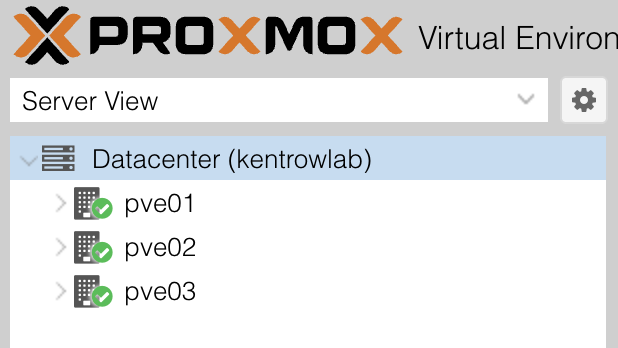
The key thing is there: Quorate: Yes, with a quorum of 2 out of 3. Losing a node therefore doesn’t bring the cluster down objective achieved.
This capture is current, hence the Config Version: 5. At the end of phase 2, it was at 3 and that number tells a story: the value increments with each change to the cluster configuration, so here pvecm create (1) then the two pvecm add (2 and 3). A +1 per join, exactly as expected.
Step 5: cluster-level storage (pve_storage)#
The last step, and the quickest, because it beautifully illustrates what a cluster brings. Storage is declared just once, on pve01, and the cluster takes care of the rest.
The role is tiny:
ansible/roles/pve_storage/
├── defaults/main.yml   # id, pool and content type
└── tasks/main.yml      # an idempotent pvesm add
# ansible/roles/pve_storage/defaults/main.yml
---
pve_storage_zfs_id: "{{ zfs_pool_name }}"
pve_storage_zfs_pool: "{{ zfs_pool_name }}"
pve_storage_zfs_content: "images,rootdir"# ansible/roles/pve_storage/tasks/main.yml
---
- name: Check whether ZFS storage is declared
ansible.builtin.command: "pvesm status --storage {{ pve_storage_zfs_id }}"
register: pve_storage_existing
changed_when: false
failed_when: false
- name: Declare ZFS pool as cluster storage
ansible.builtin.command: >-
pvesm add zfspool {{ pve_storage_zfs_id }}
--pool {{ pve_storage_zfs_pool }}
--content {{ pve_storage_zfs_content }}
--sparse 1
--nodes {{ groups['pve'] | join(',') }}
when: pve_storage_existing.rc != 0
changed_when: trueTwo options of the pvesm add deserve a word:
--sparse 1: allocation on demand. On a lab with VMs that have generous but sparsely filled disks, it makes all the difference in terms of space actually used.--content images,rootdir:imagesfor VM disks (KVM),rootdirfor LXC volumes. The pool therefore serves both tiers of the architecture (Dokploy in LXC, Talos in VMs).
The playbook, and a chicken-and-egg trap#
This is the chance to finally show a playbook (until now we’d only seen roles). And it hides a trap that hit me square in the face. My first instinct: target the primary node directly.
hosts: "{{ pve_cluster_primary }}"Error processing keyword 'hosts': 'pve_cluster_primary' is undefinedA play’s hosts: is evaluated before inventory variables are resolved: you can’t use a group variable there, it’s a real chicken-and-egg problem. The solution: target the whole pve group, and condition the task on the right node.
# ansible/pve-storage.yml
---
- name: Declare cluster storage
  hosts: pve
  become: false
  gather_facts: false
  tasks:
    - name: Configure storage on primary node
      ansible.builtin.include_role:
        name: pve_storage
      when: inventory_hostname == pve_cluster_primary
Why just once? Because /etc/pve/storage.cfg lives in pmxcfs, the cluster’s replicated filesystem. I write on pve01, and the configuration propagates all on its own to the three nodes. The proof is in querying pve02, even though I declared nothing on it:
Name           Type     Status     Total (KiB)      Used (KiB) Available (KiB)        %
local           dir     active       102626232        12476980        84889988   12.16%
nvme-vm zfspool active 483656464 11896808 471759656 2.46%Write once, the cluster propagates. That’s the whole logic behind how this phase is split: the ZFS pool is created per node (step 3, before the cluster), but the storage is declared just once after the cluster (step 5). /etc/pve isn’t an ordinary local folder, it’s a database replicated across all the nodes.
What couldn’t be done (and why)#
A quick reminder: at the end of part 7, I announced that this phase would include replication and configuring the backup server. That plan had to be revised, and I’d rather own it than pretend.
ZFS replication. I discovered a nuance I hadn’t anticipated in ADR-0003: pvesr replicates VMs, not nodes. With not a single VM at this stage, there’s simply nothing to replicate, no job to create. Replication isn’t an infrastructure configuration, it’s a per-VM attribute. It will therefore come naturally in phases 5 and 6 of the roadmap (the Dokploy and Talos VMs ones). What phase 2 could do, it did: pools with the same name on all three nodes, a cluster storage declared. The ground is ready.
The backup server (pbs01). It stays on the bench for two very down-to-earth reasons: it’s missing a power supply (all taken by the PVEs) and its RAM upgrade is pending the famous incompatible DDR4 from part 7, since that old 9020 is DDR3L. No impact on the cluster: the PBS is independent by design (ADR-0002). Its integration will be a later addition, along the way fixing the root sizing left hanging in phase 1.
Where things stand after phase 2#
| Item | State |
|---|---|
| pve-manager | 9.2.5 on all 3 nodes |
| Repositories | no-subscription active, enterprise and Ceph disabled |
| ZFS ARC | capped at 4 GiB |
| ZFS pool | nvme-vm, ONLINE, 476 GB, identical on all 3 |
| Cluster | kentrowlab, 3 nodes, quorate, config version 3 |
| Cluster storage | nvme-vm (zfspool, sparse), active everywhere |
| Idempotence | validated on all 4 playbooks |
| ansible-lint | production profile, 0 violations |
Three isolated machines have become a real cluster, entirely described by replayable code. But above all, this phase reminded me of a truth I won’t forget any time soon: the green light isn’t proof. The only proof is the state you actually get, checked by hand.
And now?#
The cluster is running, but everything is still done from my workstation, by hand. In part 9, we tackle the day-2 foundations: a scoped Proxmox API token tucked away in SOPS, an OpenTofu state backend encrypted client-side, and a GitLab Runner in LXC so that the pipelines can finally reach the local network. In other words: the moment automation starts running on its own.
See you soon!